
macOS · Longbridge OpenAPI · Local only · v1.2.0
One-click liquidation built like a native Mac app.
LB Liquidator is a local-only desktop tool for Longbridge Securities. Pick positions, choose a ratio, confirm — market orders go straight from your Mac to the OpenAPI.
Apple Silicon .dmg · Free and open source · Auto-updates
- Binds to
- 127.0.0.1
- Languages
- EN · 简 · 繁
- Quote refresh
- 5 s
- Telemetry
- None
Everything you need to get flat, fast.
A focused trading utility, not a brokerage app. Every action is one or two keystrokes away.
-
Native desktop shell
Icon rail, positions sidebar, tabs, details panel and status bar in a fixed window. Overlay title bar, native menus, remembered window size.
-
One-click liquidation
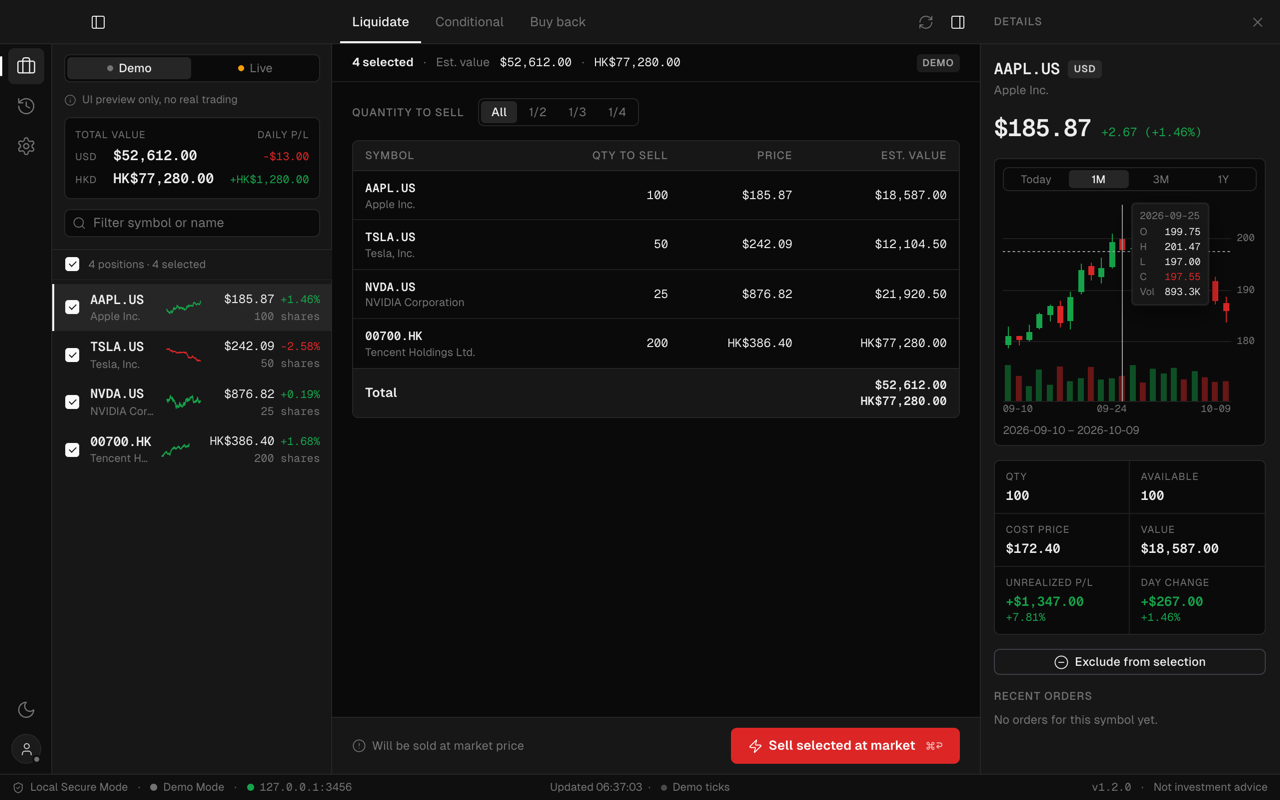
Select positions, sell All, 1/2, 1/3 or 1/4 at market. A confirmation lists every symbol, quantity and estimated value first.
-
Conditional orders
Batch stop-loss, take-profit and trailing stops across many positions, with trigger price or percentage and time in force.
-
Buy back
Liquidated by mistake, or the dip is over? Re-enter the exact positions you just sold from a saved snapshot.
-
Real-time chart & quotes
Intraday line with volume and previous close, plus 1M / 3M / 1Y candles. Prices refresh every 5 s; each row carries a sparkline.
-
Order history
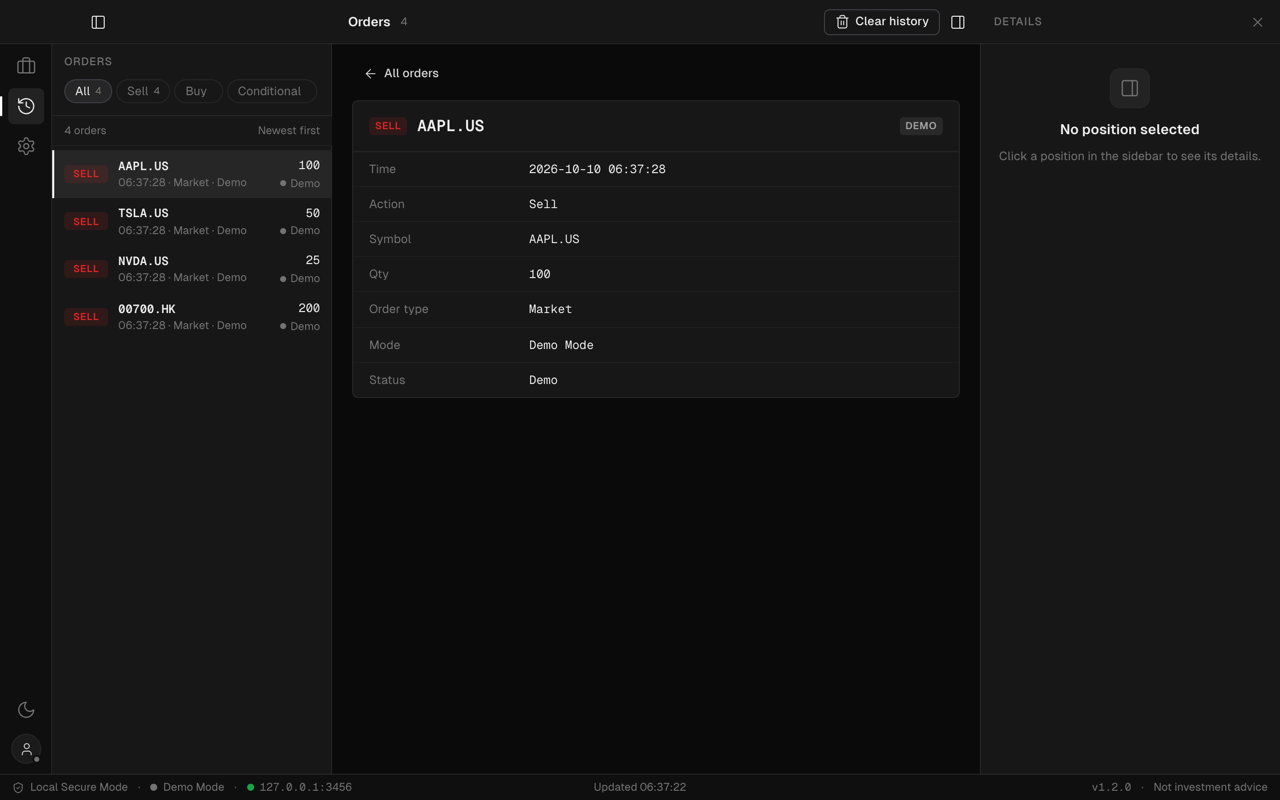
Every sell, buy and conditional order is logged locally with status and order ID. Filter by type, inspect in the details panel.
-
Local-only security
The API server binds to 127.0.0.1. Credentials stay in the app on your Mac and go nowhere except Longbridge. Open source.
-
Keyboard-first
⌘R refresh, ⌘A select all, ⌘↩ confirm, ⌘1/2/3 views, ⌘F filter, ⌘/ for the full sheet. Native menus share the same actions.
Positions at a glance.
The sidebar is the whole account in one column: a Demo | Live switch, per-currency totals with daily P/L, a filter, and every position with its price, day change and a 48×16 intraday sparkline. Quotes refresh every five seconds while the window is visible.
- Per-currency totals, never converted
- ↑ ↓ to move · Space to toggle
- ⌘F filter by symbol or name
Sell with intent.
Tick the positions to exit and pick a ratio — All, 1/2, 1/3 or 1/4. The table shows quantity and estimated value per symbol, and nothing is sent until a confirmation lists every order and its total. Want a plan instead of a market order? Conditional orders set stop-loss, take-profit or trailing stops in one batch.
- ⌘↩ confirm · Esc cancel
- Stop-loss · take-profit · trailing stop
- Live mode is marked in amber everywhere
Charts and live quotes.
Select a symbol and the details panel shows what matters before you sell: price, a real-time chart, quantity, cost, value, unrealised P/L and day change. Today is an intraday line with volume and the previous close; 1M, 3M and 1Y switch to candles.
- Today · 1M · 3M · 1Y
- Hover for O / H / L / C and volume
- Polling pauses when the window is hidden
Orders and buy back.
Every order the app places is written to a local history — sells, buys and conditional orders, with time, quantity, status and order ID. Sold too early? Buy back re-enters the exact positions from the last liquidation snapshot, at market.
- Filter: All · Sell · Buy · Conditional
- Stored on this Mac, last 500 orders
- Buy back from the last snapshot
Built like a native app
One window. Five regions. Nothing scrolls that shouldn’t.
The 1.1 redesign replaced the old web page with a fixed desktop layout modelled on tools like Xcode and Linear: dense, calm, and monochrome, with colour reserved for meaning.

- 01
Rail
Positions, Orders, Settings. Theme and account at the bottom.
- 02
Sidebar
Demo | Live switch, per-currency totals, filter and the position list with live sparklines.
- 03
Tabs
Liquidate, Conditional, Buy back. The sell button lives in a sticky footer with its shortcut.
- 04
Details
Price, real-time chart, cost and P/L for the selected symbol. ⌘D to toggle.
- 05
Status bar
Mode, local server, live-quote indicator, version and update progress.
What changed
| Before 1.1 | Now v1.2.0 |
|---|---|
| A scrolling web page | Fixed native window, overlay title bar |
| Static prices | Live quotes, sparklines and a real-time chart |
| Credentials in a modal | Settings → Account with a connection test |
| No history | Local order history with filters |
| Manual update downloads | In-app updater with progress and restart |
Your keys never leave your Mac.
LB Liquidator has no backend, no account and no analytics. It is a local app that talks to one host: Longbridge.
// src/server.js
app.listen(3456, '127.0.0.1')

// CORS: an allowlist, never "*"
tauri://localhost
http://127.0.0.1:3456

// tauri.conf.json → CSP
script-src 'self'; font-src 'self' data:-
Loopback only
The bundled API server listens on 127.0.0.1:3456 — never 0.0.0.0 — with a strict CORS origin allowlist.
-
Credentials stay local
App Key, App Secret and Access Token are stored on this Mac and sent only to the Longbridge OpenAPI.
-
Locked-down webview
A strict Content Security Policy: no remote scripts, no CDNs, fonts and icons bundled in the app.
-
Demo by default
The app opens in Demo mode with mock data. Live trading is an explicit switch, marked in amber everywhere.
-
Open source
Every line is on GitHub. Read it, build it yourself, or open an issue.
See it in both appearances.


Download · v1.2.0
Get flat in one click.
Free for macOS on Apple Silicon. Starts in Demo mode, so you can try every flow before connecting a real account.
Already installed? The app checks for updates on launch, downloads with progress in the status bar and restarts itself.